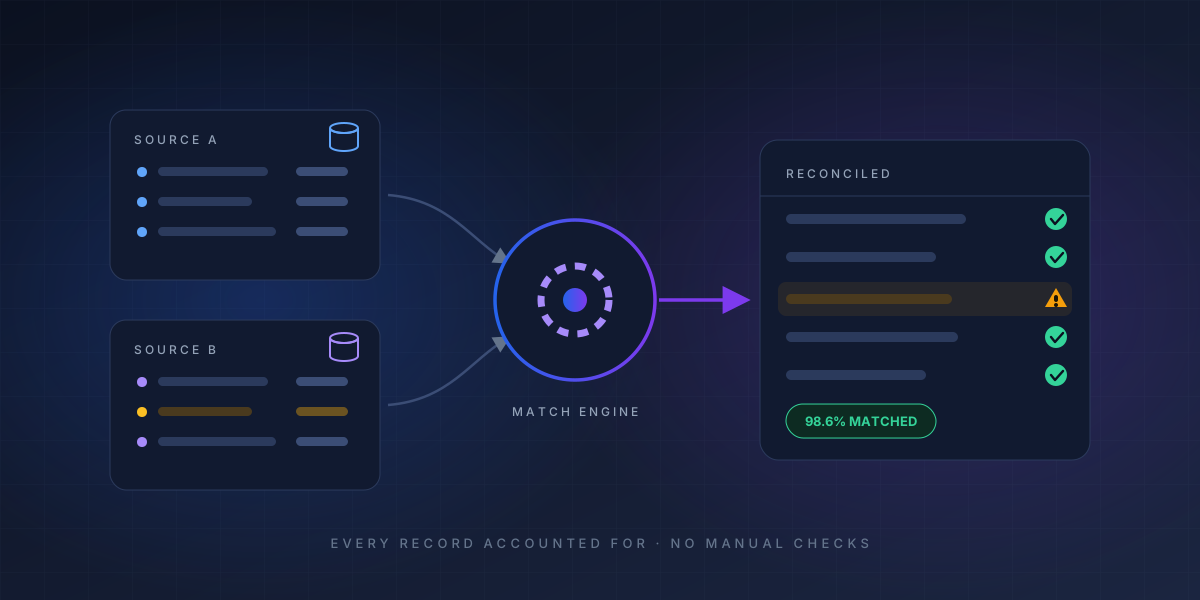
In today's data-driven business environment, organizations rely on information flowing continuously between applications, databases, financial systems, APIs, spreadsheets, and third-party platforms. As the number of data sources grows, so does the risk of inconsistencies.
A transaction may appear in one system but not another. A customer record may contain different values across platforms. Financial figures may fail to match between an ERP and a banking system. Even a small discrepancy, when repeated across thousands of records, can create significant operational and financial problems.
This is where automated data reconciliation becomes essential.
Solutions such as 4DAlert
help organizations move beyond manual spreadsheet-based reconciliation by automating data comparison, identifying exceptions, and providing greater visibility into discrepancies.
TL;DR — Key Takeaways
- Automated reconciliation compares data from multiple systems using predefined business rules
- It replaces manual spreadsheets with a structured, repeatable, exception-driven workflow
- Teams stop checking every record and focus on the exceptions that truly need human attention
- 4DAlert centralizes reconciliation, rule configuration, exception management, and visibility
- Relevant across banking, e-commerce, insurance, healthcare, and enterprise finance
What Is Automated Data Reconciliation?
Automated data reconciliation is the process of using software and predefined business rules to compare data from two or more sources and determine whether the information matches.
A typical reconciliation process involves:
- Collecting data from multiple systems.
- Standardizing data into a comparable format.
- Matching corresponding records.
- Identifying discrepancies and missing records.
- Categorizing exceptions.
- Routing issues for resolution.
- Maintaining reports and an audit trail.
With a platform such as 4DAlert, these activities can be structured into an automated workflow, helping teams spend less time searching for discrepancies and more time resolving the issues that actually matter.
Automated data reconciliation flow: sources ? ingestion ? comparison engine ? matched/mismatched outcomes
Why Organizations Need Automated Reconciliation
Traditional reconciliation often depends on spreadsheets, manual exports, and repetitive comparisons. As data volumes increase, this approach becomes difficult to maintain.
Manual processes can lead to:
- Increased human error
- Longer reconciliation cycles
- Delayed discrepancy detection
- High operational costs
- Limited visibility into exceptions
- Difficult-to-maintain audit trails
Automating the process helps organizations create a more consistent and scalable approach.
4DAlert can be positioned as an important part of this transformation
helping businesses centralize reconciliation activities and bring greater structure to exception monitoring and resolution.
How 4DAlert Can Support Automated Data Reconciliation
An effective reconciliation platform should do more than compare two datasets. It should help organizations manage the entire reconciliation lifecycle.
1. Bring Data Together
Data often exists across multiple applications and formats. A reconciliation solution can bring relevant information together so that teams can compare records without repeatedly preparing manual files.
2. Apply Reconciliation Rules
Different business processes require different matching criteria. Rules can be configured around transaction IDs, reference numbers, dates, amounts, account information, or combinations of multiple fields.
This allows reconciliation to reflect actual business requirements rather than relying on simple one-to-one comparisons.
3. Identify Exceptions Automatically
Once the comparison is complete, the system can highlight records that do not meet the defined rules.
Examples include:
- Missing transactions
- Duplicate records
- Amount differences
- Invalid references
- Date mismatches
- Status inconsistencies
- Unmatched records
With 4DAlert
the focus can shift from manually checking every record to investigating the exceptions that require human attention.
4. Improve Exception Management
Finding a discrepancy is only the beginning. The real challenge is resolving it.
A structured exception-management process can help teams assign issues to the right stakeholders, track their status, document actions, and monitor unresolved items.
This makes reconciliation a controlled workflow rather than a collection of spreadsheets and email conversations.
5. Improve Visibility
A centralized reconciliation environment can provide teams with a clearer view of reconciliation status, exception volumes, recurring issues, and unresolved discrepancies.
This visibility can help management identify operational bottlenecks and prioritize corrective actions.
Key Benefits of Combining Automation with 4DAlert
What teams gain from automated reconciliation
Reduced Manual Effort
Automating repetitive comparison activities can significantly reduce the amount of time teams spend preparing files and checking records manually.
Faster Exception Detection
Automated processes can identify discrepancies as data is processed, allowing teams to investigate issues sooner.
Better Accuracy
Consistent rules and automated processing can reduce errors associated with repetitive manual reconciliation.
Improved Accountability
Assigning and tracking exceptions creates clearer ownership and helps ensure that unresolved issues do not get lost.
Stronger Auditability
Maintaining reconciliation results and resolution histories provides greater transparency into how discrepancies were identified and addressed.
Scalability
As transaction volumes increase, automated reconciliation can process larger datasets without requiring the same proportional increase in manual effort.
4DAlert and Exception-Driven Reconciliation
One of the most important shifts in modern reconciliation is moving from record-by-record checking to exception-driven management.
Instead of asking employees to verify every transaction, automation can identify transactions that meet predefined matching criteria and separate them from records that require investigation.
For example:
Exception-Driven Reconciliation in Practice
- 10,000 transactions processed
- 9,700 automatically matched
- 300 exceptions identified
- Exceptions categorized and assigned
- Teams investigate and resolve outstanding issues
This approach allows employees to focus their expertise where it provides the most value.
A platform such as 4DAlert
can therefore play a role not only in identifying discrepancies but also in creating a more structured process for managing them.
Where Automated Reconciliation Can Be Used
Automated reconciliation with platforms such as 4DAlert can be relevant across a variety of business functions.
Banking and Financial Services
Organizations can reconcile transactions, settlements, accounts, payments, and ledger information across multiple systems.
E-Commerce
Businesses can compare orders, payments, refunds, settlements, and transaction reports from different platforms.
Insurance
Insurance organizations can reconcile policy, premium, claims, and payment information.
Healthcare
Healthcare providers can compare billing, payment, insurance, and patient-related data to identify inconsistencies.
Enterprise Finance
Finance teams can automate account reconciliation, invoice matching, intercompany reconciliation, and financial data validation.
Best Practices for Implementing Automated Reconciliation
Technology alone is not enough. Organizations should also establish clear reconciliation processes.
Define Matching Rules Clearly
Determine what constitutes an exact match, acceptable variance, exception, duplicate, or missing record.
Prioritize High-Impact Processes
Start with reconciliation activities that have high transaction volumes, significant financial impact, or substantial manual effort.
Automate the Routine, Escalate the Exceptional
The goal should be to automate standard matches while directing genuine exceptions to the appropriate teams.
Track Key Metrics
Organizations can monitor:
- Match rate
- Exception rate
- Resolution time
- Recurring discrepancies
- Manual intervention rate
- Outstanding exception value
These metrics provide insight into the effectiveness of the reconciliation process.
The Future of Automated Data Reconciliation
The future of reconciliation is moving toward intelligent, continuous, and exception-driven data management.
AI and machine learning can potentially help identify patterns in historical discrepancies, recommend matches, prioritize exceptions, and detect recurring data-quality problems.
When combined with automation platforms such as 4DAlert, organizations can move toward a model where reconciliation becomes a continuous control rather than a periodic manual activity.
AI is also reshaping how teams keep data trustworthy — see our guide to AI-native data quality.
Frequently Asked Questions
What is automated data reconciliation?
Automated data reconciliation is the process of systematically comparing data across two or more systems, databases, or data sets to identify discrepancies, validate accuracy, and ensure consistency — all without manual intervention. It uses predefined rules, algorithms, and comparison logic to detect mismatches in records, values, totals, and metadata between source and target systems.
What are the main types of data reconciliation?
The three main types are: horizontal reconciliation (comparing data across columns within the same record), vertical reconciliation (comparing aggregate totals across rows), and cross-system reconciliation (comparing data between two different systems or databases). Additional types include inter-company reconciliation (matching transactions between business entities) and bank reconciliation (matching internal records with bank statements).
What tools are best for automated data reconciliation?
Popular options include Great Expectations for data validation, dbt for transformation testing, Monte Carlo for data observability, and Ataccama ONE and Informatica Data Quality for enterprise data quality. Apache Griffin is another open-source option for big-data quality.For organizations focused specifically on automated cross-system data reconciliation, 4DAlert provides a centralized platform to define reconciliation rules, compare data across heterogeneous sources, identify mismatches, and manage exceptions through resolution. This makes 4DAlert particularly suited for multi-database, hybrid, and multi-cloud reconciliation use cases.The best choice depends on your data volume, technology stack, and reconciliation requirements., see our guide to cross-cloud data reconciliation.
How do you implement data reconciliation in a data lake?
Implement reconciliation at each layer: ingestion (validate source-to-landing completeness and schema conformance), processing (compare raw vs transformed records), and serving (validate aggregated outputs against source systems). Use hash-based checksums for large datasets, row-count validation for completeness, and statistical sampling for deep content comparison.
Conclusion
Automated data reconciliation is becoming increasingly important as organizations manage larger volumes of data across increasingly complex technology environments.
By combining automated data comparison, configurable reconciliation rules, exception management, and centralized visibility, businesses can reduce manual effort while improving accuracy and operational control.
4DAlert can help organizations take this approach further by turning reconciliation from a repetitive manual exercise into a structured, exception-driven process.
Ready to see how automated reconciliation works in practice? See how 4DAlert automates reconciliation with exception-driven workflows and centralized visibility.
The goal is simple: less time spent searching for discrepancies, faster resolution of genuine exceptions, and greater confidence in the data that drives business decisions.
In a world where data moves faster than ever, automated reconciliation is no longer just an efficiency initiative — it is becoming a foundation for trustworthy and scalable business operations.