TL;DR — Key Takeaways
- Schema compare tools fall into five categories: editor built-ins, migration frameworks, dedicated comparators, IDE diff, and change platforms
- Free built-ins from Microsoft and pgAdmin cover most one-off needs for SQL Server and PostgreSQL
- If you need a gate in CI/CD, choose a tool with a headless diff command, not only a GUI
- Evaluate on engine coverage, diff granularity, deployment safety, CI integration, and post-deploy drift detection
- Point-in-time comparison answers "what differs"; continuous comparison answers "when did this change and who is affected"
The report says revenue is up twenty percent. It is not.
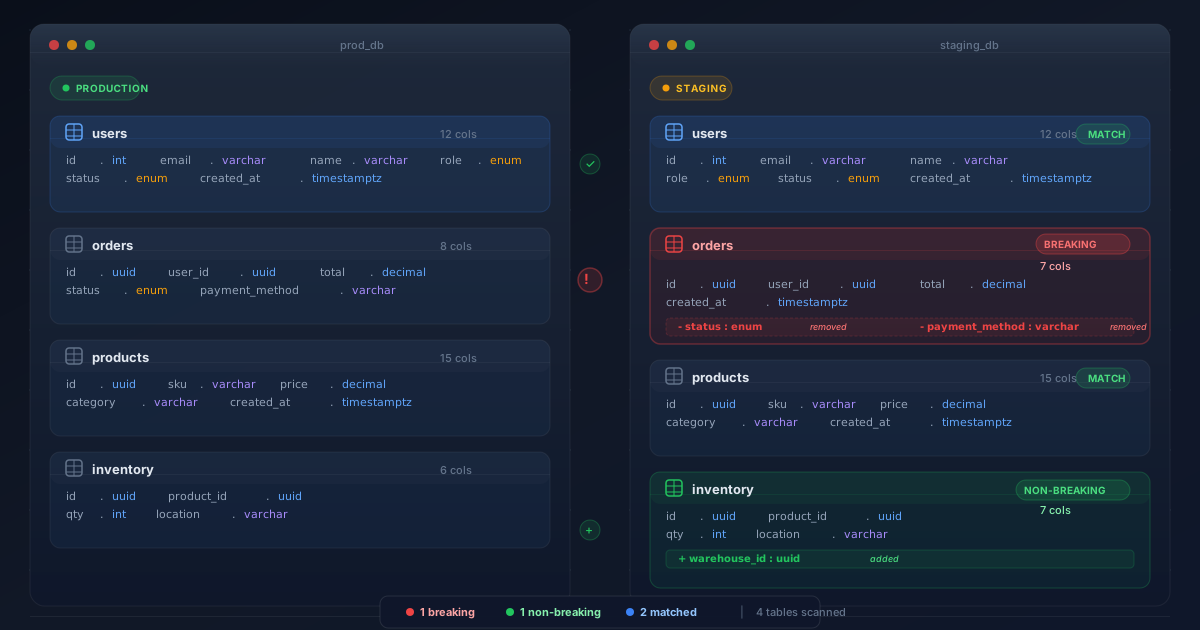
The staging database has a column the production database does not. The migration that added it was applied to development, tested, approved - and then skipped in production because the change window closed. Everything downstream continued to run, because nothing checks that the structure a query assumes actually exists.
A schema compare tool is the thing that catches this. This guide covers what they all do, how they differ, and which kind fits which workflow.
1. What Is a Schema Compare Tool?
A schema compare tool reads the structure of two database definitions and reports the differences between them. The two sides can be two live databases, a database and a script folder, a database and a version-controlled model, two snapshots, or a database and a compiled .dacpac.
A useful comparison covers far more than tables:
- Tables and columns, including data type, length, precision, scale, nullability, and defaults
- Primary keys, foreign keys, unique constraints, and check constraints
- Indexes, including included columns and filter conditions
- Views, stored procedures, functions, and triggers
- Sequences, schemas, and database-level objects
- Grants and permissions, when the tool supports security comparison
- Reference data, when the tool also does row-level comparison
The output is what makes one tool better than another. A good comparison gives you a field-level, line-by-line diff you can read in a pull request, classifies each difference as an addition, change, or deletion, lets you exclude specific differences you do not want applied, and can generate a script that brings the target in line with the source.
Three things people use it for
Verification - did my migration produce the schema I intended? Synchronisation - make this environment match that one. Drift detection - has anyone changed production outside the pipeline?
2. Five Categories of Schema Comparison Tool
The tools in this list are not interchangeable. Knowing which category you need eliminates most of the shortlist immediately.
The five categories are not interchangeable — knowing which row you need removes most of the shortlist immediately.
| Category | Examples | Best for | Limitation |
|---|---|---|---|
| Editor built-ins | SSMS, pgAdmin, Azure Data Studio | Ad-hoc comparison by a human, right now | Manual, no CI, single engine |
| Migration frameworks | Flyway diff, Liquibase diff, Atlas | Gating a pipeline; generating migration scripts from a diff | Diff is a supporting feature, not the product |
| Dedicated comparators | Redgate SQL Compare, dbForge Schema Compare | Deep, granular, production-grade synchronisation | Usually licensed per seat, GUI-first |
| IDE diff | DataGrip, DBeaver | Developers who live in an IDE | Shallow reporting, no automation story |
| Change platforms | Bytebase, 4DAlert | Review, approval, audit, and continuous monitoring | More to adopt than a diff button |
The most common mistake is buying from the wrong row. A team that needs a CI gate will be disappointed by an IDE diff; a developer who wants a side-by-side view will find a change platform heavyweight.
3. The Comparison: 12 Tools Side by Side
The table below covers the tools teams most often shortlist. Capability notes reflect the product as documented by its vendor; always confirm current features and licensing before committing, as these change between releases.
| Tool | Category | Engine coverage | Headless / CI | Best for |
|---|---|---|---|---|
| SSMS Schema Compare | Built-in | SQL Server, Azure SQL, dacpac, SQL projects | Via SqlPackage and VS Code | SQL Server estates already standardised on SSMS |
| Visual Studio / SSDT | Built-in | SQL Server, Azure SQL, dacpac, SQL projects | Yes, command line available | Teams using SQL database projects in source control |
| MSSQL extension for VS Code | Built-in | SQL Server, Azure SQL | Partial | Developers who have left Visual Studio behind |
| pgAdmin Schema Diff | Built-in | PostgreSQL | No | PostgreSQL administration without extra tooling |
| DataGrip | IDE diff | SQL Server, PostgreSQL, MySQL, Oracle, and others | No | Developers who want a fast side-by-side diff |
| DBeaver | IDE diff | Broad, community and pro editions | No | Multi-engine teams on a light budget |
| Flyway diff | Migration framework | SQL Server, Oracle, PostgreSQL, MySQL and cloud variants | Yes - CLI, snapshots, artifacts | Pipeline gates in Flyway estates |
| Liquibase diff / diff-changelog | Migration framework | Broad, via JDBC drivers | Yes - fully headless | Generating a changelog from an unknown target |
| Atlas schema diff | Migration framework | MySQL, MariaDB, PostgreSQL, SQLite | Yes - code-first CLI | Declarative, code-first schema workflows |
| Redgate SQL Compare | Dedicated | SQL Server and Azure SQL | Yes - CLI and automation | Deep SQL Server synchronisation at scale |
| dbForge Schema Compare | Dedicated | SQL Server, MySQL, PostgreSQL, Oracle | Yes - command line available | Mixed-engine estates needing one comparator |
| Bytebase | Change platform | Broad, modern and legacy engines | Yes - API and pipeline driven | Review and approval workflows in a web UI |
Disclosure: this list covers third-party products only. Our own product, 4DAlert, is discussed separately in section 9.
Two observations from the table. First, engine coverage splits the field more than anything else - if you run only SQL Server, the free Microsoft tooling is genuinely competitive and the choice comes down to workflow. Second, "headless / CI" is binary in practice: a tool either has a diff command you can call from a build, or it does not, and if it does not it cannot gate anything.
4. How to Evaluate a Schema Compare Tool
Vendor feature lists are not evaluation criteria. These six questions are.
- Which engines does it actually cover? "Multi-database" often means two. Check the specific engine and version, and check whether the same object types are compared across all of them - PostgreSQL comparison that skips partitioning configuration is not equivalent to SQL Server comparison that covers filegroups.
- How deep is the diff? Column order, data type precision, nullability, filtered index definitions, extended properties, permissions. Ask for a sample output on a database with a thousand objects and read it.
- Can it run headless? You need a diff command with machine-readable output for a pipeline gate. GUI-only tools are useful and cannot enforce anything.
- Does it generate a safe script, or a destructive one? Compare the script it produces for a dropped column. A tool that will happily emit
DROP COLUMNwithout a flag is a tool you must configure before it is safe to automate. - Does it support exclusion and policy? You will need to ignore whitespace, ignore a specific legacy object, or block a change class entirely. That is the difference between a tool that fits your estate and one you work around.
- Can it detect drift after deployment? Comparison at deploy time catches changes you made. Comparison on a schedule catches changes someone else made. Ask whether it can run unattended against production and alert.
Verdict
Try each candidate against one real database with real quirks - a view that depends on a column you are renaming, a trigger nobody remembers, a schema with a space in the name. Synthetic demos hide exactly the problems you are buying the tool to find.
5. Free and Built-In Options
For a large number of teams, the free option is the right answer.
Microsoft's tooling has improved considerably. Schema Compare ships in SSMS 22.7 and later as a preview feature, in Visual Studio with SQL Server Data Tools, and through the MSSQL extension for Visual Studio Code. In every case the comparison source and target can be a connected database, a .dacpac, or a SQL database project; results are presented as a git-style set of actions, individual differences can be excluded, and the comparison can be saved as an .scmp file so the same comparison can be rerun or shared. The same capability is reachable from the command line through SqlPackage, which is what makes it usable in a pipeline.
pgAdmin's Schema Diff covers PostgreSQL within the administration tool most PostgreSQL teams already have. It compares two databases and produces the statements to move one toward the other. It is a manual tool - you run it when you want to - which suits ad-hoc verification but not automated gating.
IDE diff in DataGrip and DBeaver is the fastest path when a developer just wants to see what changed. It is excellent for the moment a developer asks "why does staging differ from local" and poor for everything else.
The honest limitation of all built-ins is that they compare when a human asks. They do not watch, they do not alert, and they do not record who changed what. For verification during development, free is genuinely enough. For production governance, you need something that runs on its own.
6. Migration Frameworks with Diff
If you already use a migration framework, its diff command is often the shortest path to a CI gate, because it is already installed and already in your pipeline.
Flyway exposes flyway diff, built on Redgate's comparison technology, comparing environments, schema models, migrations via a build environment, snapshots, or an empty baseline. The result is stored as a diff artifact that subsequent commands read, and flyway prepare turns it into a deployment script. flyway check -changes compares two snapshots for drift reporting. Coverage spans SQL Server, Oracle, PostgreSQL, and MySQL with their cloud variants.
Liquibase provides snapshot, diff, diff-changelog, and generate-changelog across its supported databases. diff-changelog is the one worth remembering: it both lists the differences and generates a deployable changelog that resolves them, which is exactly the workflow when you discover a change someone made directly in production. Object types compared are configurable, including columns, foreign keys, indexes, primary keys, sequences, views, and stored procedures.
Atlas takes the declarative route: describe the desired state in code, and let atlas schema diff or atlas migrate diff work out the change. It fits teams who would rather model schema than write migrations.
The trade-off across all three is that comparison is a supporting feature of a deployment tool. Depth of diff is good, but the object-type coverage and option granularity usually trail a dedicated comparator. If comparison is the primary job, use a comparator; if deployment is the primary job and comparison is the gate, the framework's own diff is usually the pragmatic choice.
7. Dedicated Comparators and Change Platforms
Redgate SQL Compare is the long-standing dedicated comparator for SQL Server. It compares databases, scripts folders, snapshots, and backing up states, produces deployment scripts with granular options, and can run from the command line for automation. Its strength is maturity: edge cases around collation, extended properties, and filegroup placement have been found and fixed over many years.
dbForge Schema Compare covers SQL Server, MySQL, PostgreSQL, and Oracle from one product, which matters in mixed estates. It offers comparison profiles, scheduling, and a command line, and it includes data comparison alongside schema comparison.
Bytebase sits in a different category: a web-based database change and review platform. Comparison is part of a workflow that includes SQL review policies, approval routing, and an audit trail. It solves the "who approved this" question that a comparator deliberately does not address.
The distinction worth internalising: a comparator makes one database match another. A change platform decides whether that should happen, records that it did, and catches what happens outside the process. Most teams need both and buy only one.
8. Agentic AI and Schema Comparison
Comparison is a well-defined mechanical task, which is exactly the shape of work agents are good at - provided the decision stays human.
Explaining a diff instead of producing one. Rather than reading two hundred differences, you ask which of them can break a downstream pipeline and get back the four that matter, with the reasoning: this one renames a column referenced by a view, that one narrows a type that currently stores values exceeding the new precision.
Generating the fix. Given a diff, an agent can propose the migration that closes it, in the correct expand-contract sequence, with a rollback and a note on what it locks.
Classifying risk. Each difference can be scored by blast radius using lineage and query logs, so review effort is spent on the changes that can actually hurt.
Writing the review summary. The artifact attached to a pull request becomes a paragraph explaining impact rather than a raw diff nobody opens.
Where the line must hold: an agent should never decide that a breaking change is acceptable to apply. The durable pattern is an agent that proposes and explains, a deterministic comparison that verifies, and a human who approves. Note also that agents are heavy consumers of schema - an agent reading a table with a silently renamed column does not error, it answers confidently and wrongly. Which is a second reason comparison belongs in the loop.
9. How 4DAlert Compares
4DAlert is our own product, so treat this section as the vendor pitch it is - and evaluate it against the criteria in section 4 rather than against the rest of this list.
- It runs continuously, not on demand. Every connected environment is snapshotted on a schedule and compared against a baseline and against the other environments. Drift is found when it happens rather than when someone happens to look.
- The diff is written for a reviewer. Field-level additions, changes, and removals, with the affected object and its environment named - readable in a pull request without opening a client.
- It maps blast radius. Each difference is linked to the downstream models, pipelines, and reports that reference it, so risk tiering is evidence-based.
- It works across engines. One baseline model and one alert format regardless of how many database technologies the estate contains.
- It produces the audit record automatically. What changed, when, where, and what was affected - retained as history, which is what turns a diff into governance.
If your need is a one-off synchronisation in SQL Server, the free Microsoft tooling is likely the better answer and we would say so. If your need is to know within minutes that production schema changed and which dashboards it affects, that is the problem 4DAlert is built for.
Frequently Asked Questions
What is a schema compare tool?
A schema compare tool reads the structure of two databases - or a database and a version-controlled model - and reports the differences between them at object and field level: tables, columns, data types, nullability, keys, indexes, constraints, views, and permissions. It presents those differences as a reviewable diff and can generate a script that makes the target match the source. The same mechanism is used to verify a migration, detect drift between environments, and produce the change script for a deployment.
Which schema compare tool is best for SQL Server?
For a free option, Microsoft ships Schema Compare in SSMS 22.7 and later, in Visual Studio with SQL Server Data Tools, and through the MSSQL extension for Visual Studio Code - all comparing databases, .dacpac files, and SQL database projects. For commercial use in larger estates, Redgate SQL Compare and dbForge Schema Compare are the established dedicated options, with the migration frameworks Flyway and Liquibase also providing diff commands that work against SQL Server.
Which schema compare tool is best for PostgreSQL?
pgAdmin ships a free Schema Diff tool for PostgreSQL. Flyway and Liquibase both support PostgreSQL with diff commands usable in a pipeline. Atlas, originally built for MySQL and PostgreSQL, offers schema diff and migration generation from code. For commercial tooling, dbForge Schema Compare supports PostgreSQL alongside other engines.
Can schema comparison run in CI/CD?
Yes, and this is where comparison earns its place. The pattern is to build a disposable database, apply the migration chain, and diff the result against a committed baseline or against the production schema. A non-empty diff fails the build. Most modern tools offer this: Liquibase diff and diff-changelog, flyway diff, atlas schema diff, and SqlPackage and Schema Compare for SQL Server projects can all run headless.
What is the difference between schema comparison and schema drift detection?
Schema comparison is a single operation between two points in time or two environments. Schema drift detection is comparison run repeatedly and automatically against a baseline, with alerting when something changes unexpectedly. A comparison tells you what differs right now; drift detection tells you when something started differing, who changed it, and which downstream consumers are affected.
How does 4DAlert compare with other schema tools?
Most schema compare tools are designed to run when someone asks them to - a developer pressing a button, or a step in a pipeline. 4DAlert is built to run continuously: it snapshots every connected environment on a schedule, compares each against a baseline and against the others, and raises an alert with a field-level diff and the downstream reports affected. It adds the ownership and audit layer that a point-in-time comparison does not provide.
Conclusion
Picking a schema compare tool starts with one question: do you want to press a button, or do you want to be told? The first answer leads to the free built-ins and the IDE diff tools, which handle ad-hoc comparison well. The second leads to a headless diff in your pipeline plus scheduled comparison in production.
From there the selection is mostly mechanical. Check the engines you actually run. Confirm the tool runs without a human. Read the script it would generate for a dropped column. And try it against a database with real history rather than a clean demo.
Whichever tool you choose, the habit matters more than the product: compare before you deploy to verify, and compare after you deploy to confirm. Teams that do both find schema problems in review instead of in production.