Here's a scenario every data team has lived through: a pipeline that's been running fine for months suddenly breaks on a Monday morning. After an hour of debugging, someone discovers that a column was renamed in the source database over the weekend. No ticket. No Slack message. No documentation.
This is schema drift — and it's one of the most common, most preventable causes of data pipeline failures. Schema comparison is the practice of detecting these changes systematically, before they cascade into broken dashboards, failed ETL jobs, and lost trust in data.
1. What Is Schema Comparison?
Schema comparison is the process of analyzing two database schemas — typically a source and a target, or two environments like production and staging — to identify structural differences. These differences can include:
- Added or removed tables — new tables introduced or old ones dropped
- Column changes — columns added, removed, renamed, or having their data type altered
- Constraint modifications — primary keys, foreign keys, unique constraints, or NOT NULL rules changed
- Index differences — indexes added or removed that affect query performance
- View and stored procedure changes — logic updates that affect downstream consumers
The goal isn't just to list differences — it's to identify breaking changes (things that will cause failures) versus non-breaking changes (safe additions) so teams can respond appropriately.
2. Why Schema Drift Hurts Data Teams
Schema drift occurs when databases evolve over time without synchronized documentation or change management. It's especially common in organizations with multiple environments (dev, staging, production) or multiple databases feeding into shared analytics pipelines. For the full definition, the common causes, and how to detect and prevent it, see our guide to schema drift.
"The most dangerous schema changes are the ones nobody notices — until a dashboard shows NULLs where last month's revenue used to be."
The impact of unchecked schema drift includes:
- Pipeline failures: ETL and ELT jobs break when expected columns are missing or renamed
- Silent data corruption: Type mismatches cause data to be cast incorrectly, producing wrong results without errors
- Broken dashboards: BI tools like Tableau, Power BI, or Looker fail when underlying schemas change
- Compliance risks: Audit trails become unreliable when schema changes aren't tracked
- Developer friction: Teams waste hours debugging issues that should have been caught automatically
3. Manual vs. Automated Schema Comparison
Many teams still compare schemas manually — running SHOW COLUMNS in one terminal, copy-pasting into a spreadsheet, and eyeballing the differences. This works when you have three tables. It doesn't scale when you have hundreds.
Manual comparison
- Works for small, one-off checks
- Error-prone — easy to miss subtle type changes
- Doesn't track history or version changes over time
- Doesn't integrate with CI/CD pipelines
Automated comparison
- Runs on a schedule or triggered by events (like a deployment)
- Compares hundreds of tables in seconds
- Classifies changes as breaking vs. non-breaking
- Integrates with version control and alerting systems
- Maintains a history of schema versions for auditing
For any team managing more than a handful of tables across multiple environments, automated schema comparison isn't a luxury — it's a necessity. For a side-by-side look at the options, see our comparison of schema compare tools. For a broader look at automating your data operations, see our guide to automated data reconciliation.
4. What to Compare Across Schemas
A thorough schema comparison goes beyond just listing tables. Here's what to examine:
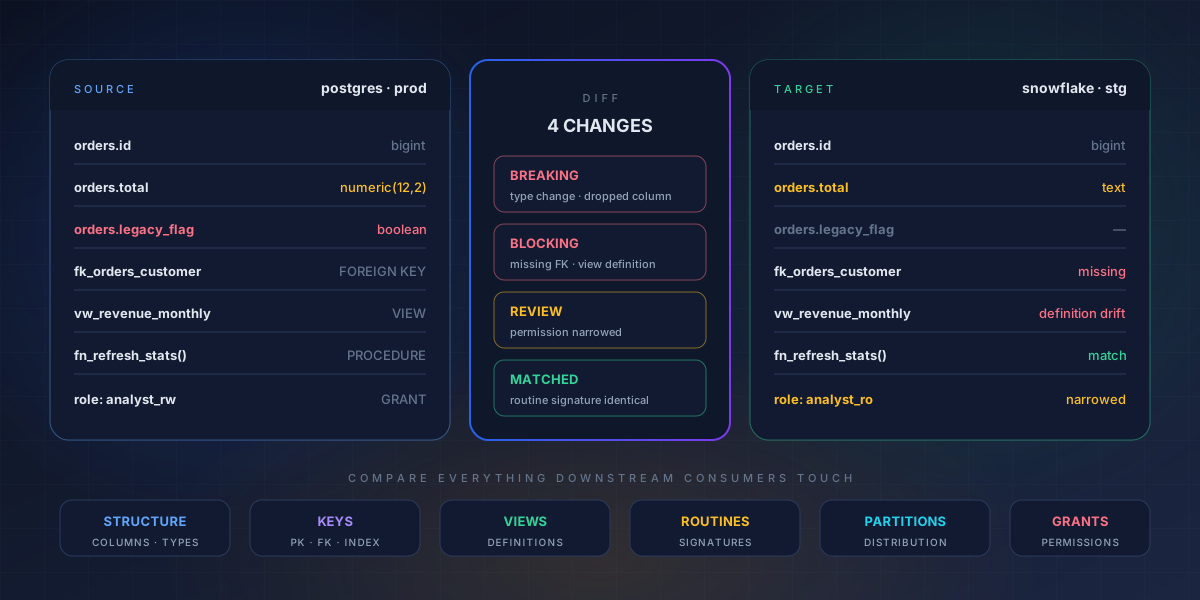
A thorough comparison goes past table listings: structure, keys, views, routines, distribution and permissions all need to be diffed, because any of them can break a downstream consumer.
- Table structure: Column names, data types, nullability, default values, and auto-increment settings
- Keys and constraints: Primary keys, foreign keys, unique constraints, check constraints, and indexes
- Views: View definitions, column aliases, and underlying query logic
- Stored procedures and functions: Parameter lists, return types, and logic changes
- Partitions and sharding: Partition schemes and distribution keys (critical for Snowflake, Redshift, BigQuery)
- Permissions: Role-based access changes that could affect downstream consumers
The more comprehensively you compare, the fewer surprises you'll encounter in production. If you're also managing data quality across these schemas, our guide to data modeling best practices covers how to design schemas that resist drift.
5. Schema CI/CD: Making It Part of Your Workflow
The most effective way to prevent schema drift is to treat schema changes like code changes — reviewed, tested, and deployed through a controlled pipeline. The surrounding process — who requests, approves, and audits each change — is database change management.
- Version control your schemas: Store DDL scripts, migration files, or ORM models in Git
- Automate comparison in CI: On every pull request, compare the proposed schema against production and flag breaking changes
- Gate deployments: Block merges if unapproved breaking changes are detected
- Alert on drift: When production schemas change outside the pipeline (e.g., manual DBA edits), detect and alert immediately
- Audit everything: Maintain a log of who changed what, when, and why
This approach transforms schema management from a reactive fire drill into a proactive, auditable process. For the full pipeline — stages, tooling, and where agentic AI fits — see our guide to building a database CI/CD pipeline. For more on building reliable data pipelines, see our DevOps best practices for data teams.
6. How 4DAlert Simplifies Schema Compare
While there are open-source tools and manual scripts for schema comparison, they often require significant setup and maintenance. 4DAlert provides a purpose-built solution for schema CI/CD as part of its broader data management platform.
What 4DAlert brings to schema comparison
- Automated schema monitoring: Continuously watches schemas across SQL Server, PostgreSQL, Oracle, Snowflake, and other databases — detecting changes the moment they happen
- Environment-to-environment comparison: Compare dev vs. staging, staging vs. production, or any two database environments in a single click
- Breaking change detection: Automatically classifies changes as safe (additive) or breaking (removals, type changes) so teams know what needs attention
- CI/CD integration: Plugs into GitHub Actions, GitLab CI, Azure DevOps, and other pipelines — making schema checks a gate in your deployment process
- Slack and email alerts: Notifies the right people when unexpected schema changes occur outside the deployment pipeline
- Schema version history: Maintains a full audit trail of every schema change, who made it, and when
Instead of building and maintaining custom schema comparison scripts, teams get a production-ready solution that works across their entire database estate. For teams also handling cross-system data validation, 4DAlert's automated reconciliation features pair naturally with schema monitoring.
7. Best Practices for Schema Comparison
Whether you use 4DAlert, open-source tools, or a custom solution, these practices will help you get the most from schema comparison:
- Compare early and often: Run schema checks in CI before code is merged, not after deployment
- Baseline your schemas: Capture a known-good snapshot of each environment to compare against
- Focus on breaking changes: Not every difference matters — prioritize changes that affect downstream consumers
- Include views and procedures: Schema comparison isn't just about tables — views and stored procedures can break pipelines too
- Automate alerts for manual changes: If someone edits production directly (bypassing CI), detect it and notify the team
- Document your schema contracts: Define which columns and types downstream systems depend on, and treat changes to those as breaking by default
- Review schema diffs in pull requests: Make schema changes visible to the whole team, not just the person who made them
Getting Started
Schema comparison is one of those practices that seems optional until something breaks — and then it becomes the highest priority on the roadmap. The good news is that it's straightforward to implement, especially with tools designed for the job.
If your team is dealing with frequent pipeline failures, untracked schema changes, or the pain of manual comparison across environments, it might be time to automate. Explore 4DAlert's schema CI/CD capabilities or book a free consultation to talk through your specific setup.
Frequently Asked Questions
What is schema comparison?
Schema comparison is the process of analyzing two database schemas to identify structural differences such as added, removed, or modified tables, columns, data types, constraints, and indexes. It helps teams detect drift between environments and prevent breaking changes from reaching production.
Why is schema comparison important for data teams?
Schema comparison is critical because undocumented schema changes are a leading cause of data pipeline failures. When a column is renamed or a data type changes in production, downstream ETL jobs, dashboards, and reports break silently. Automated schema comparison catches these changes before they cause damage.
How does 4DAlert handle schema comparison?
4DAlert provides automated schema CI/CD that continuously monitors schema changes across databases, compares schemas between environments, detects breaking changes, and alerts teams before issues propagate. It integrates with existing CI/CD pipelines and supports SQL Server, PostgreSQL, Oracle, Snowflake, and other major databases.