TL;DR — Key Takeaways
- The golden rule is that old and new application versions must never need different schemas at the same time
- Expand-contract solves this in four stages - add, backfill, switch, remove - each independently reversible
- Backfill in small batches outside the transaction window, with a resumable checkpoint, so locks stay short
- Write and rehearse the rollback before running the forward migration, and never edit a migration that has run anywhere
- Test at production data volume and verify the deployed result with a schema comparison, not by reading the log
The migration ran successfully. The log says so.
What the log does not say is that the NOT NULL addition took an exclusive lock on a table with forty million rows, that writes stopped for six minutes, and that the checkout service - which was still running the previous release - began failing on every insert because it no longer sent the column the new constraint demanded.
Both problems are avoidable. Both are common. And both come down to the same omission: the migration was written as a single statement when it needed to be a sequence.
1. What Is a Schema Migration?
A schema migration is a versioned, repeatable script that moves a database from one known structure to another. Migration tooling tracks which scripts have run in which database, applies new ones in order, and refuses to reapply one that is already recorded.
That definition matters because it replaces three bad habits:
- Interactive DDL. Statements typed into a console cannot be reproduced, reviewed, or applied consistently across environments.
- Auto-migration on deploy. Frameworks that alter tables when the application starts give you no review step, no diff, and no way to know what will happen before it happens.
- Hand-applied hotfixes. A change made directly in production never reaches development, so the environments diverge - the root cause of most drift.
A well-formed migration has four properties: it is ordered and immutable, it is idempotent in effect, it has a paired reverse, and it states what it will lock and for how long.
2. The Golden Rule: Never Break the Old Version
Almost every catastrophic migration violates one rule: it requires the database and the application to change at exactly the same moment.
Deployments are never instantaneous. During a rolling release there are minutes - sometimes hours - when version N of the application and version N+1 are both running against the same database. Renaming a column in that window means one version writes a field the other cannot read. Adding a NOT NULL constraint means inserts from the old version start failing immediately.
The rule, stated precisely
At every instant during a deployment, both the previous and the next application version must be able to read and write the schema successfully. Any change that breaks this is not deployable as a single step.
There are only two ways to satisfy it. Make the change additive, so both versions can use the structure. Or accept a coordinated stop - take the service down, change everything, bring it back. Coordinated stops are legitimate for internal systems; they are not for anything with a customer attached.
A migration that only works if the deploy is atomic is not a migration. It is a hope with SQL attached.
3. The Expand-Contract Pattern
Expand-contract - also called parallel change, or expand-and-migrate - is the standard technique for satisfying the golden rule across a rolling deployment.
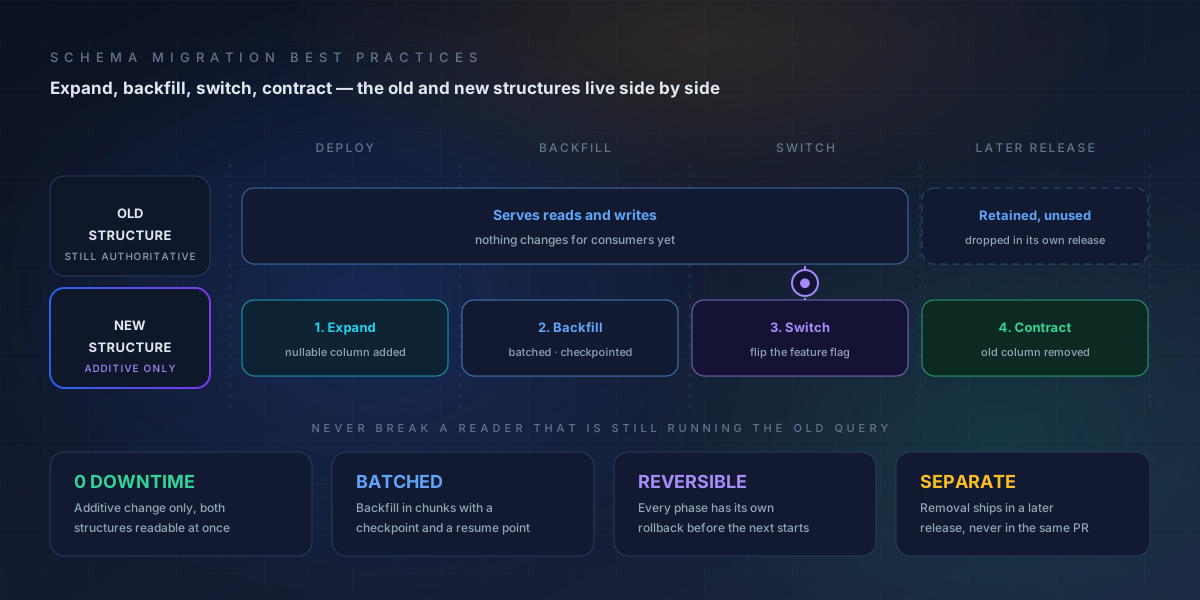
The expand-contract pattern: the new structure is added first and backfilled in batches while the old one stays authoritative, readers switch behind a flag, and the old structure is only removed in a separate release.
| Stage | What you do | State of the system | Reversible? |
|---|---|---|---|
| 1. Expand | Add the new column, table, or field alongside the old one; make it nullable or defaulted so old writers still succeed | Both old and new structures exist; nothing reads the new one yet | Yes - drop what you added |
| 2. Backfill | Populate the new structure from the old, in small batches with a checkpoint | Data is duplicated; old path still authoritative | Yes - truncate the new structure |
| 3. Switch | Change readers and writers to the new structure, ideally behind a flag so it can be flipped back | New path is authoritative; old structure still present | Yes - flip the flag |
| 4. Contract | Remove the old structure in a later release, once every consumer has moved | Only the new structure remains | Only by restore - hence the separate release |
Two details make this work in practice.
Dual-write when you cannot avoid it. If a service must keep accepting writes during the switch, write to both structures for one release and reconcile. It costs code and it buys a trivially reversible cutover. Read from the old structure until the backfill is confirmed complete, then move reads.
Delay the destructive step by a full release. Contract should never ship in the same deployment as switch. If something downstream was missed, you want a day of discovery with both structures intact - not a rollback that requires restoring data.
Expand-contract also solves the compatibility problem on the read side. A new nullable column is invisible to old queries; an old column still present is invisible to new queries. Neither version has to know the other exists.
4. Backfills Without Locking the Table
Backfills are where migrations spend their time and take their locks. A backfill that updates forty million rows in one statement holds a transaction open for the duration, blocks other writers, and produces a log file nobody can manage.
Five rules cover almost every case:
- Batch by primary key range, not by offset.
WHERE id BETWEEN ...is stable when rows are inserted or deleted during the run;OFFSETis not. - Keep each batch small and committed. A few thousand rows per transaction keeps lock duration in milliseconds and lets the database breathe between batches.
- Make it resumable. Record the last completed checkpoint. A backfill that dies at eighty percent should restart at eighty percent, not at zero.
- Run it outside peak. Not because batching makes peak unsafe, but because a sustained load on the same table as your busiest traffic is an avoidable risk.
- Verify as you go. Compare row counts and a sample of values between old and new structures after each batch. Discovering a mismatch at the end means redoing the whole run.
The common mistake is treating the backfill as part of the DDL statement. Splitting them is what makes the operation interruptible. If you must add a NOT NULL column, the safe sequence is: add nullable, backfill in batches, set the default, then add the constraint - with the constraint step being the only one that needs a careful window.
Verdict
Any migration whose duration scales linearly with table size needs to be redesigned before it is scheduled, not tuned afterwards. If it takes an hour on staging data, it will take a day on production data.
5. Rollback: How to Plan It Before You Need It
Rollback is the part everyone agrees matters and almost nobody writes. The reason is honest: reverse migrations are harder than forward ones, and writing them feels like writing code you hope never to run.
It is also the only thing standing between a failed migration at 2 a.m. and a restore from backup.
What makes rollback real:
- Write the reverse in the same commit as the forward. If the reverse does not exist, the change is not reviewed as complete.
- Match reversibility to the operation. Additive changes reverse by dropping. Type changes reverse only if the new type is wider than the old - never narrow a type you might need to return to.
- Never delete and replace in one release. Removing the old column while introducing the new one makes rollback impossible. Keep both until the new one is proven.
- Snapshot before structural changes. For Tier 3 operations, take a backup or a snapshot with a known restore time, and actually measure that restore time once before you rely on it.
- Rehearse it. A rollback that has never been executed is a hypothesis. Run it against staging at least once for any irreversible migration.
There is one class of change with no rollback: anything that destroys data. Dropping a column, removing rows, or overwriting values during a backfill. For these the plan is not rollback - it is backup plus forward-fix plus a freeze on writes until the state is verified. That distinction belongs in the review, not discovered during the incident.
6. Testing a Migration Before Production
Migration testing has four questions, and most teams only ask the first.
- Does it apply cleanly? Build a disposable database from the current baseline and run every migration in order. This catches syntax errors, missing objects, and ordering problems.
- Is the result correct? Compare the resulting schema against the intended state. Visual inspection of the log is not verification - a schema comparison either matches the baseline or it does not.
- Does the application still work? Run the application and integration test suite against the migrated database. The migration can be perfect and still break code that assumed the old shape.
- How long does it take, and what does it lock? Test at production data volume, measure each statement, and record the maximum lock duration. This is the question that decides whether the migration can run while the service is live.
Two additional tests pay off disproportionately. Test from an older baseline, because some environments lag and a migration that assumes the latest state will fail there. And test the rollback in the same pass, so the reverse path is proven while you still have context.
Tools matter here. A migration framework gives you ordered application; a test harness gives you disposable databases; a schema comparison gives you objective verification of both the forward and reverse result. Our overview of schema comparison covers how the verification step works in detail.
7. Common Migration Mistakes and What They Cost
| Mistake | What happens | Better practice |
|---|---|---|
| Renaming in place | Old readers fail the moment the rename lands | Add the new name, dual-write, migrate readers, remove the old name later |
| Single-statement backfill | Long transaction, heavy locks, table stalls | Batched, checkpointed, resumable updates |
| Narrowing a type | Truncation or conversion errors, no clean reverse | Widen only; narrow in a separate, later release |
| Editing a shipped migration | Environments silently diverge and the history lies | Freeze it; ship a new migration with the fix |
| Dropping in the same release | Rollback becomes a restore from backup | Defer contraction to a later release |
| Testing on small data | Instant in staging, hours in production | Test at production volume, measure lock duration |
| No verification after deploy | A partially applied migration goes unnoticed | Compare production against the approved state automatically |
The pattern across the list is that each mistake saves a few minutes during authoring and costs hours during an incident. Migration practice is unusual in that the cheap option and the safe option are the same option - they only look different under deadline pressure.
8. Agentic AI and Schema Migrations
Agentic AI is starting to change how migrations are written, and - more importantly - how they are checked.
Drafting the migration and its reverse. Given a stated intent, an agent can produce the expand migration, the batched backfill with a checkpoint, and the matching rollback, following the team's naming and ordering conventions. This removes the mechanical work, which is where most of the small mistakes live.
Classifying the risk. An agent can read the proposed DDL and say: this statement takes a table-level lock, this column addition requires a rewrite on this engine, this one is online-safe - with the reasoning attached, so a reviewer can check the claim rather than derive it.
Simulating the rolling window. The most valuable application: given the diff and the two application versions involved, identify which statements fail while both versions run. That is exactly the check humans skip because it requires holding several things in mind at once.
Watching the backfill. Agents can monitor batch throughput, detect a batch that has started taking longer than its neighbours, and recommend a size adjustment before the run stalls - turning a silent degradation into a notification.
The limit that stays
An agent should propose the migration, the risk classification, and the rollback. A deterministic gate should verify the diff and the tests. A person should approve anything irreversible. Autonomy belongs in the drafting, not in the deploy.
9. How 4DAlert Protects Schema Migrations
Every migration has two moments that matter: before it runs, and after. 4DAlert supplies objective evidence at both.
- Pre-migration diff. Compare the intended schema against the live baseline and see the exact field-level change set before anything executes. This is the artifact the reviewer approves.
- Post-migration verification. Re-compare after deployment. If production does not match the approved state, the mismatch surfaces immediately rather than at the first failed query.
- Drift detection. A hotfix applied outside the pipeline produces the same comparison result as a planned migration - flagged as drift, timestamped, with the owner notified.
- Dependency mapping. Each changed field is linked to the models, pipelines, and reports that consume it, so the reviewer knows the blast radius before approving.
- Historical snapshots. Because every environment's schema is retained over time, "when did this change and what did it look like before" is a query rather than an investigation.
That last point is the one teams notice most. Six months after a migration, when a report starts returning an unexpected number, the ability to see the schema as it stood on the day of the change answers the question in minutes.
Frequently Asked Questions
What is a schema migration in simple terms?
A schema migration is a versioned, repeatable script that moves a database from one known structure to another. Instead of typing ALTER statements into a live database, you write an ordered file that can be applied to development, staging, and production, tracked so the tool knows which files have already run, and paired with a way back if it fails. Migrations are how schema changes become software rather than manual work.
What is the expand-contract pattern?
Expand-contract is a way to change a schema without ever breaking the running application. Expand first: add the new column, table, or field while keeping the old one fully working. Backfill the data. Switch readers and writers to the new structure. Only then contract: remove the old structure in a later release, after every consumer has moved. Each stage is independently reversible, and at no point do old and new code disagree.
How do you roll back a schema migration?
By writing the reverse migration at the same time as the forward one and testing it. For additive changes the rollback is simply dropping what was added. For structural changes the rollback may be to restore the previous state from a snapshot and replay. The two rules that make rollback real are: never edit a migration after it has run anywhere, and never remove data in the same release that introduces its replacement.
How do you test a schema migration?
Apply it to a disposable database built from the current baseline and confirm the resulting schema matches the intended state via a schema comparison. Apply it again from an older baseline to cover lagging environments. Run the application test suite against the migrated database. Measure how long each statement takes and what locks it takes at production data volume, because a migration that is instant on ten thousand rows can stall for twenty minutes on a hundred million.
Why do schema migrations lock tables?
Many DDL operations in common databases require an exclusive lock or a full table rewrite: adding a NOT NULL column with a default, changing a column type, building an index without the online option, or changing a primary key. The lock blocks writes for the duration. The practices that avoid it are online index builds, batched backfills that never run inside one transaction, and expanding into a new structure rather than rewriting the existing one.
How does 4DAlert help with schema migrations?
4DAlert provides the before-and-after evidence. It captures the production schema as a baseline, shows a field-level diff of what the migration will change, and re-compares after deployment to confirm production matches what was approved. If a migration or hotfix alters the schema outside the pipeline, the same comparison flags it as drift with the timestamp and the affected downstream consumers.
Conclusion
Schema migration practice comes down to a handful of decisions made before the SQL is written. Keep old and new versions compatible across the deploy window. Expand before contracting, and defer the destructive step to its own release. Backfill in batches that can stop and resume. Write the reverse before the forward, and rehearse it. Test at production volume, and verify the deployed result with a comparison rather than a log line.
None of these require a large toolchain. They require the discipline to treat a migration as a sequence of reversible stages instead of a single statement - which is also, not coincidentally, what makes review fast and approvals easy to give.
The teams that do this ship schema changes on the same cadence as application code, because a well-built migration stops being an event. It becomes a routine, boring, fully documented step in an ordinary deployment.