Application teams ship code dozens of times a day. Database teams still ship schema changes through a ticket, a change advisory board, and a maintenance window. That gap is where most delivery delays — and most production incidents — actually come from.
Database CI/CD closes that gap. It applies the same version control, automated testing, peer review, and gated deployment that application teams already rely on to database schema changes, so a migration moves from a developer's machine to production through one repeatable, auditable path.
TL;DR — Key Takeaways
- Database CI/CD puts schema changes through the same versioned, tested, reviewed, and gated pipeline as application code
- The pipeline has seven stages: author, lint, build, test and compare, review, staging, production
- Schema comparison is the gate that blocks breaking changes before merge and detects drift after deploy
- Agentic AI now drafts migrations and impact analysis, but deterministic guardrails and human approval stay in the loop
- 4DAlert supplies the comparison, drift detection, and audit layer that makes the gate enforceable across environments
1. What Is Database CI/CD?
Database CI/CD is the practice of applying continuous integration and continuous delivery to database changes, so schema migrations, DDL scripts, and data model changes are versioned in Git, automatically tested against a real database, reviewed, and deployed through the same gated pipeline used for application code. It replaces manual, ticket-driven database releases with repeatable, auditable automation.
In practice, that means:
- Author the change as a migration file, not a live query typed into a production console
- Validate the SQL automatically — syntax, linting, naming conventions, policy rules
- Build a disposable database and apply the migration from scratch
- Test the result, including a schema comparison against the previous state
- Review the generated diff in the pull request, with the whole team able to see it
- Deploy through the same artifact-promotion path used for application releases
- Verify after deploy that production matches what was approved
Database CI/CD is not the same thing as a migration tool. A migration tool writes the change; CI/CD is the system that decides whether that change is allowed to move forward. It is also not infrastructure-as-code — though the two usually run side by side, one governs the schema and the other governs the servers the schema lives on.
The one-line definition
Database CI/CD means every schema change is a reviewed pull request, validated automatically, and released through a pipeline — never a hand-typed statement applied directly to production.
2. Why Traditional CI/CD Breaks at the Database
Application CI/CD assumes something the database cannot give you: that a new build replaces the old one completely. You deploy version 42 over version 41 and the state is known. Databases do not work that way. A migration mutates existing state in place, and some mutations cannot be undone — dropping a column destroys the data inside it.
"You can roll back a deploy in seconds. You cannot roll back the loss of a column that three reports depend on."
The specific reasons standard pipelines stall at the database layer:
- State, not artifacts: The database holds live data. Applying a change forward is easy; reversing it safely is often impossible
- Shared resource contention: Two teams can migrate the same database at the same time, and the second one's assumptions silently break
- Long-running migrations: Backfilling a column on a billion-row table can take hours and cannot simply be reverted
- Invisible blast radius: Renaming a column breaks every consumer nobody remembered to ask — dashboards, ETL jobs, reporting extracts, third-party integrations
- Environment drift: Development, staging, and production diverge over time, so a migration that passed in staging can fail in production
- No natural test target: Most teams have no fast, disposable copy of a realistic database to test against
Every one of these is solvable — but only if the database gets its own pipeline instead of being bolted onto the application's as an afterthought. For the broader workflow context, see our guide to DevOps best practices for data teams.
3. Stages of a Database CI/CD Pipeline
A working database CI/CD pipeline has a fixed sequence of stages. Each stage either passes or blocks the change — there is no "continue anyway" button.
| Stage | What Happens | Typical Tooling |
|---|---|---|
| 1. Author | The change is written as an ordered, versioned migration file and committed to Git | Liquibase, Flyway, Alembic, ORM migrations |
| 2. Lint and validate | SQL is parsed and checked for syntax, naming conventions, banned statements, and policy violations | sqlfluff, custom linters, policy rules |
| 3. Build | A disposable database is created from scratch and every migration is applied in order | Testcontainers, Docker, CI runner |
| 4. Test and compare | Data and contract tests run, then the resulting schema is diffed against a known-good baseline | dbt tests, contract tests, 4DAlert schema compare |
| 5. Review | The generated schema diff is shown in the pull request; approvals are required before merge | GitHub, GitLab, Azure DevOps |
| 6. Deploy to staging | The migration runs against a production-like environment with realistic data volume | Same pipeline runner, staging environment |
| 7. Promote and verify | The migration runs in production, then a post-deploy comparison confirms the schema matches what was approved | 4DAlert drift detection, monitoring and alerting |
Two properties make this work in practice. First, the pipeline is idempotent — running it twice produces the same schema, because migrations are numbered and applied exactly once. Second, every stage produces an artifact (a diff, a report, an approval record) that becomes part of the audit trail.
4. Schema Comparison: The Quality Gate
Schema comparison is what turns a delivery pipeline into a safe delivery pipeline. Without it, the pipeline only proves that the SQL parses — not that the resulting schema is the one you intended, or that it will not break something downstream.
Comparison runs at two points:
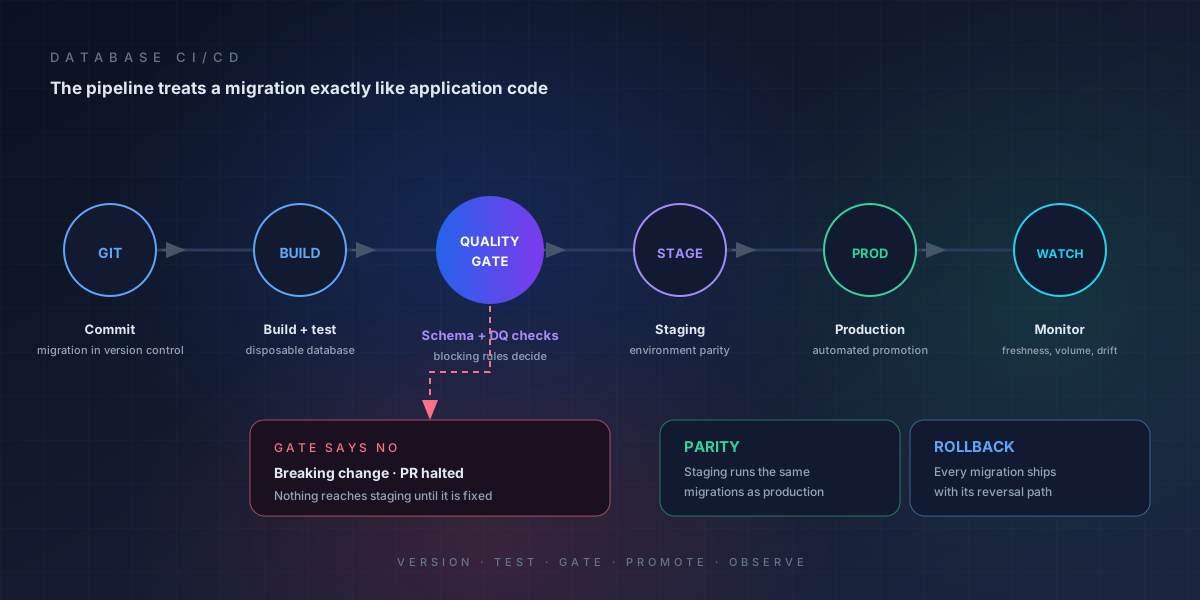
- Before merge (pre-deploy gate): On every pull request, diff the proposed schema against a known-good baseline or against production. Classify each difference as breaking (removals, type changes, constraint tightening) or non-breaking (purely additive). Fail the build when an unapproved breaking change is present
- After deploy (drift detection): Re-compare production against what the pipeline just approved. Anything that differs means someone changed the database outside the pipeline — a manual DBA edit, a hotfix, a vendor script — and that should raise an alert, not go unnoticed
The pre-deploy gate is what lets you block a dangerous change without blocking the release train. The post-deploy check is what keeps the pipeline honest over months of operation. For the full mechanics, see the schema compare guide, and for a side-by-side look at the tooling, see our comparison of schema compare tools.
The database CI/CD pipeline: a schema comparison gate sits between testing and review, blocking breaking changes and verifying production after deploy
5. Manual vs. Automated Database Change Management
Most teams start manual and stay there longer than they should, because manual review feels safer than an automated release. In practice it is the reverse — manual steps are where consistency, speed, and auditability all break down. The surrounding process — who requests, approves, and audits each change — is database change management.
| Dimension | Manual Database Change Management | Automated Database CI/CD |
|---|---|---|
| Change source | SQL typed into a console or pasted into a ticket | Versioned migration file committed to Git |
| Validation | Reviewer reads the SQL by eye | Automated linting, build, tests, and schema diff on every commit |
| Breaking change detection | Found in production, by whoever the change breaks | Found in CI, classified and blocked before merge |
| Environment consistency | Staging and production drift apart silently | Every environment is built from the same migration chain |
| Rollback | Best-effort reverse script, written under pressure | Roll back the artifact or forward-fix; the previous state is known |
| Audit trail | Change tickets reconstructed after the fact | Commit, diff, approval, and deploy log generated automatically |
| Cycle time | Days to weeks, gated on change advisory boards | Minutes to hours, gated on automated checks and peer review |
| Out-of-pipeline edits | Undetected until something fails | Detected by post-deploy drift comparison and alerted |
6. Database CI/CD Tools Compared
No single tool covers the whole pipeline. Teams typically combine a migration framework, a CI runner, a test harness, and a schema comparison gate.
| Tool | Category | Best For |
|---|---|---|
| Liquibase | Migration framework (open source / commercial) | Changelog-driven migrations with policy checks and CI/CD integrations |
| Flyway | Migration framework (open source / commercial) | Simple, SQL-first versioned migrations with a clean CLI and CI hooks |
| Alembic and ORM migrations | Migration framework (open source) | Python, Django, and Rails projects where the ORM owns the schema |
| dbt | Transformation and testing (open source / cloud) | Data pipeline models and tests — not a substitute for DDL migration control |
| Testcontainers | Test harness (open source) | Spinning up disposable real databases in CI to apply and test migrations |
| GitHub Actions, GitLab CI, Azure DevOps | CI runner | Orchestrating the stages and enforcing the merge gate |
| 4DAlert | Commercial platform | Environment-to-environment schema comparison, breaking-change classification, drift alerting, and audit history across the whole database estate |
Migration frameworks decide how changes are written. CI runners decide when changes run. Only a comparison layer decides whether the resulting schema is the one you approved — which is why teams running mature database CI/CD almost always add one.
7. Agentic AI in Database DevOps
The newest layer in the database CI/CD stack is agentic: an AI agent that handles the analysis and drafting work between a natural-language request and a reviewed migration. It does not replace the pipeline — it feeds it better input, faster. The architecture, the use cases that work today, and the failure modes to design against are covered in our guide to agentic AI in database DevOps.
A well-designed agentic workflow for database changes follows a fixed sequence:
- Parse the request: Convert a plain-language change request into a structured intent — which entity, which attributes, what constraint
- Run impact analysis: Trace dependencies to find which views, reports, pipelines, and services consume the objects being touched
- Propose a rollout plan: Additive first, backfill, then constraint enforcement — or a shadow table and swap for larger restructures
- Generate the migration: Emit the ordered DDL, backfill, and rollback statements as a reviewable diff
- Apply deterministic guardrails: Lint the output, block destructive statements, enforce naming and policy rules, and require a human approval step
- Evaluate: Apply the result to a disposable database, run the test suite, and compare the schema — only then surface the pull request
Where the human stays
Agentic does not mean autonomous. The agent proposes; the pipeline decides. Guardrails — destructive-statement blocking, mandatory review, and the schema comparison gate — run deterministically, outside the model. Anything the agent gets wrong is caught by the same checks that catch a human's mistake.
The practical payoff is that the analyst or developer states the change once, and the pipeline produces the impact report, the migration, and the test evidence. Human expertise shifts from writing DDL to reviewing blast radius — which is the part that actually requires judgment. For the wider pattern, see our guide to AI agents in the enterprise.
8. How 4DAlert Fits a Database CI/CD Pipeline
A migration framework and a CI runner get a change moving. 4DAlert is what makes the gate real across a heterogeneous estate — SQL Server, PostgreSQL, Oracle, Snowflake, and everything in between.
What 4DAlert adds to the pipeline
Comparison as a merge gate
Every pull request is diffed against production and against a known-good baseline, so unsafe changes are caught before merge rather than after deploy.
Breaking-change classification
Differences are automatically sorted into additive and breaking, so reviewers see what actually matters instead of reading hundreds of lines of DDL.
Cross-environment comparison
Compare dev against staging, staging against production, or any two environments in one click — the fastest way to find where drift has already set in.
Post-deploy drift detection
When someone edits production outside the pipeline, 4DAlert detects the difference from the approved schema and alerts the team immediately.
Pipeline integrations
Connects to GitHub Actions, GitLab CI, and Azure DevOps so comparison results become a build status, not a separate dashboard to remember to check.
Full audit history
Every change, comparison, and approval is retained with who, what, and when — which is what auditors ask for when a schema change is questioned.
The same estate-level visibility makes 4DAlert useful outside release day: pairing schema monitoring with automated data reconciliation gives teams one place to catch both structural drift and the data inconsistencies it causes.
9. Best Practices and Rollout Roadmap
Teams that adopt database CI/CD well do it in stages rather than all at once. Trying to gate every change on day one produces enough friction that the pipeline gets bypassed — and a bypassed pipeline is worse than no pipeline at all.
Phase 1: Version control and repeatable builds
Move every schema change into migration files in Git. Make it possible to build a complete environment from an empty database using migrations only. Until this is true, nothing downstream can be automated.
Phase 2: Automated validation in CI
Add linting and a disposable-database test on every pull request. The goal here is fast feedback — the developer learns within minutes that the migration does not apply cleanly, instead of finding out at deployment time.
Phase 3: The comparison gate
Introduce schema comparison as a required status check. Start by flagging without blocking for a sprint or two so the team can tune which changes count as breaking, then switch to blocking.
Phase 4: Drift detection and alerting
Turn on post-deploy comparison and route alerts to the team channel. This is the phase where manual out-of-pipeline edits stop being invisible.
Phase 5: Agentic assistance
Layer in impact analysis and migration drafting once the deterministic gates are trustworthy. The agent's output is only as safe as the checks it has to pass.
Across all phases, a handful of rules hold:
- Never edit production directly. Every change enters through a migration, including hotfixes
- Make migrations idempotent and ordered. Re-running the pipeline must not change the outcome
- Test against realistic data volume. A migration that passes on an empty database says nothing about lock time on a real one
- Define your schema contract. Treat any change to a column that downstream systems depend on as breaking by default
- Keep the diff in the review. If a reviewer cannot see what the change does to the schema, they cannot approve it responsibly
- Monitor the gate, not just the deploy. Track blocked-change rate, drift events, and mean time to merge as pipeline health metrics
Frequently Asked Questions
What is database CI/CD?
Database CI/CD is the practice of applying continuous integration and continuous delivery to database changes, so schema migrations, DDL scripts, and data model changes are versioned in Git, automatically tested against a real database, reviewed, and deployed through the same gated pipeline used for application code. It replaces manual, ticket-driven database releases with repeatable, auditable automation.
What is the difference between database CI/CD and a schema migration?
A schema migration is a single change to the database structure, such as adding a column or creating a table. Database CI/CD is the pipeline that produces, tests, reviews, and releases those migrations. The migration is the unit of work; database CI/CD is the system that moves that unit of work safely from a developer's machine to production.
What are the stages of a database CI/CD pipeline?
The standard stages are: (1) author the migration in version control, (2) lint and validate the SQL, (3) build a disposable database and apply the migration, (4) run automated tests and a schema comparison against the previous state, (5) review the generated diff in the pull request, (6) deploy to staging, and (7) promote to production with rollback available at every step.
Which tools are used for database CI/CD?
Common tools include migration frameworks such as Liquibase, Flyway, Alembic, Django Migrations, and Rails Migrations; CI runners such as GitHub Actions, GitLab CI, and Azure DevOps; and testing utilities such as Testcontainers. Schema comparison and drift detection tools like 4DAlert supply the quality gate that blocks unsafe changes before they merge.
How does schema comparison fit into database CI/CD?
Schema comparison runs as a gate inside the pipeline. On every pull request it diffs the proposed schema against a known-good baseline or against production, classifies each difference as breaking or non-breaking, and fails the build when an unapproved breaking change is present. It also runs after deployment to detect drift caused by manual changes made outside the pipeline.
Can AI write and deploy database migrations safely?
AI can draft migrations, run impact analysis, and propose rollouts, but only when deterministic guardrails stay in the loop. A safe agentic workflow converts a natural-language request into a structured plan, checks dependencies and blast radius, generates SQL, runs linting and dry-run tests against a disposable database, and requires human approval before merging or deploying. The agent proposes; the pipeline decides.
Conclusion
Database changes will never behave exactly like application deploys — the state is live, and some changes cannot be undone. But that is an argument for better gates, not for staying manual.
Teams that treat schema changes as reviewed, versioned, automatically validated artifacts ship faster and break less. The sequence is unglamorous and it works: get migrations into Git, build environments from scratch, add comparison as a merge gate, turn on drift detection, and only then let an agent start drafting the work.
For the surrounding details, see our guides to what schema drift is and how to prevent it and to schema migration best practices — expand-contract, batched backfills, and rollbacks that are actually tested.
Ready to Gate Your Database Releases?
4DAlert gives your database CI/CD pipeline its comparison, classification, and drift-detection layer — across SQL Server, PostgreSQL, Oracle, Snowflake, and everything in between. Schedule a free consultation to see how quickly a schema gate can be running in your environment.
The goal is simple: every schema change is reviewed before it runs, verified after it runs, and visible to the whole team either way.